

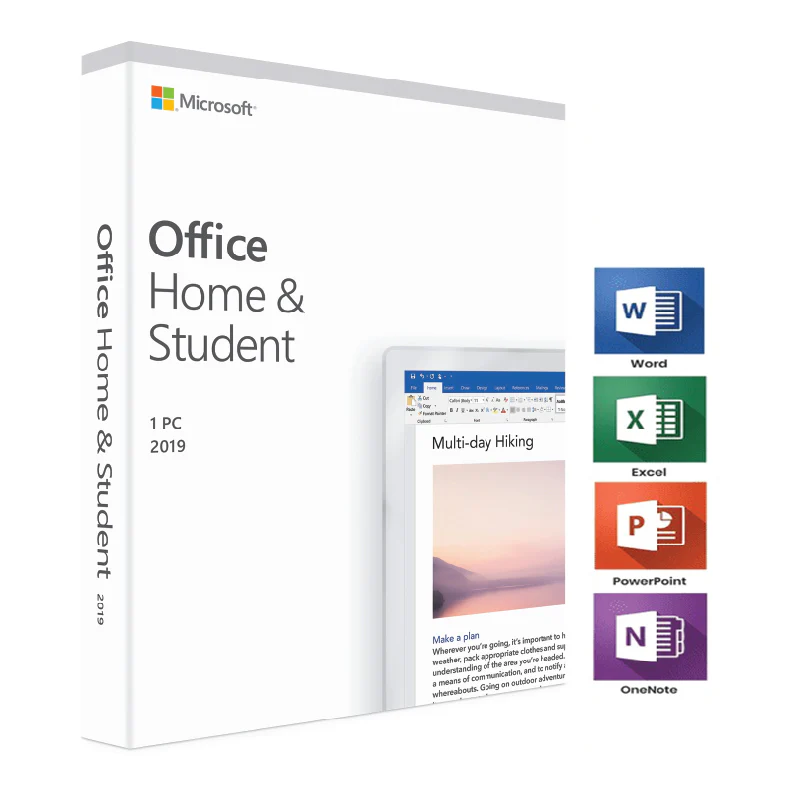
Office 2019 Home and Student is a Microsoft Office 2019 edition designed for users who need traditional desktop productivity applications for everyday documents, spreadsheets, presentations and personal work. The supplied product reference identifies this product as Microsoft Office 2019 Home and Student – Phone Activation.
Office 2019 is part of Microsoft’s traditional, non-subscription Office product family. It is different from Microsoft 365, which is a subscription-based service that receives ongoing feature updates and cloud-connected services.
Before purchasing or installing this product, customers should carefully review the edition, activation information, operating-system requirements and current Microsoft support status. Microsoft officially lists Office Home & Student 2019 as part of the Office 2019 product family.
Important: Microsoft ended support for Office 2019 for Windows on October 14, 2025. This product page therefore provides current lifecycle information so customers can make an informed decision before purchasing an Office 2019 product.
Table of Contents
- Office 2019 Home and Student Overview
- Understanding the Office 2019 Home and Student Edition
- Office 2019 Home and Student Applications
- Microsoft Word 2019
- Microsoft Excel 2019
- Microsoft PowerPoint 2019
- Microsoft OneNote and Office 2019
- Office 2019 Home and Student Features
- Traditional Desktop Office Experience
- Office 2019 Home and Student Installation
- Phone Activation Information
- Office 2019 Home and Student System Requirements
- Windows Compatibility
- Office 2019 Support and Lifecycle
- Office 2019 and Microsoft 365
- Things to Check Before Purchasing
- Office 2019 Troubleshooting
- Using Office 2019 for Everyday Productivity
- Office 2019 for Students and Home Users
- Documents, Spreadsheets and Presentations
- Security and Support Considerations
- Other Microsoft Office Options
- Frequently Asked Questions
- Conclusion
Office 2019 Home and Student Overview
Office 2019 Home and Student is an edition of Microsoft Office 2019 intended for traditional desktop productivity. It belongs to the Office 2019 family that Microsoft released for users who wanted a specific Office version rather than an ongoing Microsoft 365 subscription.
The supplied product reference identifies this product as Microsoft Office 2019 Home and Student – Phone Activation. The product should therefore be considered together with the activation information and purchasing conditions displayed on the Nexlic product page.
Microsoft’s official lifecycle documentation confirms that Office 2019 includes a Home and Student edition. Microsoft also states that Office 2019 follows the Fixed Lifecycle Policy. The Office 2019 lifecycle began in 2018 and reached its end of support in October 2025.
For the latest official lifecycle information, customers can consult the Microsoft Office 2019 Lifecycle documentation.
Because Office 2019 is now outside Microsoft’s support period, this page should not be interpreted as a statement that Microsoft currently provides ongoing support for this version. Customers who require a currently supported Office release should compare newer versions before making a purchase.
Understanding the Office 2019 Home and Student Edition
Microsoft Office is available in different editions, and each edition can have a different application lineup and intended use. Office Home & Student 2019 is one of the consumer Office 2019 editions listed by Microsoft.
The Home and Student name is important because it distinguishes this edition from other Office 2019 products such as Home and Business or Professional editions.
When comparing Office products, customers should not assume that all editions contain the same applications or provide the same services. Always verify the exact edition before purchasing.
The product reference supplied for this page is specifically for Office 2019 Home and Student with phone activation. Nexlic product information should therefore be used for the actual commercial details of the product, while Microsoft documentation should be used for general Office 2019 technical and lifecycle information.
Office 2019 Home and Student Applications
Office 2019 Home and Student is associated with Microsoft’s classic desktop productivity environment. The Office 2019 family provides applications for common productivity tasks such as creating documents, working with spreadsheets and preparing presentations.
The applications commonly associated with the Home and Student edition include Word, Excel and PowerPoint, while OneNote is also part of Microsoft’s broader Office application ecosystem.
Because Microsoft can update its documentation and product availability over time, customers should always verify the exact applications associated with the specific product edition they intend to purchase.
Microsoft Word 2019
Microsoft Word is a desktop word-processing application designed for creating and editing documents. Word can be used for letters, reports, assignments, business documents, resumes, notes and many other types of written content.
For home users, Word can provide a practical environment for preparing documents and organizing written information. Students can use it for essays, assignments and research-related documents.
Word also supports document formatting and editing functions that make it suitable for professional and personal workflows.
Microsoft Excel 2019
Excel is Microsoft’s spreadsheet application. It provides tools for organizing information into rows and columns, performing calculations, using formulas and working with structured data.
Excel can be used for household budgets, lists, schedules, calculations, academic projects and many other spreadsheet-based tasks.
Users working with larger spreadsheets should always consider their computer’s available memory and storage as well as the size and complexity of their files.
Microsoft PowerPoint 2019
PowerPoint is Microsoft’s presentation application. It allows users to create slide-based presentations containing text, images, charts and other visual elements.
Students can use PowerPoint for classroom presentations, while home users can create presentations for personal projects, events or other activities.
The desktop presentation environment is one of the familiar components of the traditional Microsoft Office experience.
Microsoft OneNote and Office 2019
OneNote is Microsoft’s digital note-taking application and forms part of the wider Office ecosystem. It can be used for organizing notes, information, lists and other content into notebooks.
When purchasing a specific Office edition, customers should verify the exact application list applicable to that edition rather than assuming that every Office application is included in every Office package.
Office 2019 Home and Student Features
Office 2019 Home and Student provides the traditional desktop Office experience associated with the 2019 release. It is intended for users who want to work with Office documents, spreadsheets and presentations using desktop applications.
Office 2019 introduced various improvements compared with earlier Office releases. Microsoft documented improvements across Office applications in areas such as productivity, editing, presentations and data-related workflows.
However, Office 2019 should be distinguished from Microsoft 365. Microsoft 365 is designed as an ongoing subscription service with continuous updates, while Office 2019 is a fixed Office release with a defined product lifecycle.
This distinction is particularly important today because Office 2019 has reached the end of Microsoft’s support lifecycle.
Traditional Desktop Office Experience
One of the main characteristics of Office 2019 is its traditional desktop application model.
Instead of relying entirely on browser-based applications, Office 2019 provides desktop applications that can be installed on a compatible computer and used for Office productivity tasks.
This model can be familiar to users who have previously worked with older Microsoft Office releases.
Office 2019 is therefore different from Microsoft 365 not only in licensing structure but also in its update and support model.
Microsoft’s official documentation explains that one-time-purchase Office suites are different from Microsoft 365 subscription services. You can review the current Microsoft documentation on Office suites and system requirements.
Office 2019 Home and Student Installation
Before installing Office 2019 Home and Student, prepare your computer and check the applicable requirements.
It is recommended to close unnecessary applications before installation and make sure enough disk space is available.
If another Office version is already installed, review Microsoft’s installation guidance before proceeding. Multiple Office installations can sometimes create conflicts depending on the configuration.
General Installation Preparation
- Check the supported operating-system environment.
- Verify available disk space.
- Make sure Windows is functioning correctly.
- Review any existing Office installation.
- Use the appropriate Microsoft Office installation procedure.
- Follow the activation instructions associated with your product.
- Open an Office application after installation to verify that it starts correctly.
Installation requirements can depend on the Office edition and operating system. Microsoft’s documentation should always be considered the primary technical reference.
Phone Activation Information
The supplied product reference specifically identifies this product as Office 2019 Home and Student – Phone Activation.
Customers should follow the activation instructions supplied with their order and use the appropriate activation process for the product.
Activation is an important part of setting up Microsoft Office. The exact procedure can depend on the type of product and the activation method associated with the purchase.
Do not use unofficial activation utilities, modified Office installers or software designed to bypass Microsoft’s activation process.
If activation does not work as expected, first check the information supplied with the order and verify that the installation corresponds to the correct Office edition.
Office 2019 Home and Student System Requirements
Microsoft’s current documentation specifically includes Office Home & Student 2019 in the Office 2019 system-requirements section.
For Office 2019 on Windows, Microsoft lists a 1.1 GHz or faster, 2-core processor, 4 GB RAM or 2 GB RAM for 32-bit installations, approximately 4 GB of available disk space and a minimum 1280 × 768 display resolution.
Microsoft’s current documentation also lists Windows 11 for the Office 2019 consumer editions covered by that requirements page.
Graphics hardware acceleration requires DirectX 9 or later, according to Microsoft’s requirements documentation.
Some Office functionality can have additional requirements. For that reason, the official Microsoft documentation should be checked before installation.
For the current requirements, visit Microsoft’s official Office system requirements page.
Windows Compatibility
Office 2019 is an older Microsoft Office generation and customers should pay close attention to Windows compatibility.
Microsoft’s current consumer Office requirements documentation lists Windows 11 for Office 2019. The documentation also provides requirements for the Office 2019 applications included in applicable suites.
Compatibility is different from support. A product may technically install in an environment while the product itself is no longer within Microsoft’s support lifecycle.
This distinction is particularly important for Office 2019 because Microsoft ended support for the Windows version of Office 2019 on October 14, 2025.
Office 2019 Support and Lifecycle
Office 2019 is no longer supported by Microsoft.
Microsoft’s official lifecycle page lists Office 2019 under the Fixed Lifecycle Policy and explicitly includes the Home and Student edition.
Microsoft lists October 14, 2025 as the end of support for Office 2019. The lifecycle page also shows the earlier end of mainstream support in 2023.
These dates are important for customers considering Office 2019 today.
Office 2019 should not be presented as a currently supported Office release. Customers who require current Microsoft support should consider a newer Office version or Microsoft 365, depending on their requirements.
Microsoft also states that connections from Office 2019 to Microsoft 365 services such as Exchange Online and SharePoint Online are no longer supported as of October 2023.
For detailed lifecycle information, consult Microsoft’s official Office 2019 Lifecycle page.
Office 2019 and Microsoft 365
Office 2019 and Microsoft 365 are different Microsoft product models.
Office 2019 is a specific Office release with a fixed lifecycle. Microsoft 365 is a subscription-based service that includes Office applications and other services depending on the selected plan.
Microsoft 365 is designed around ongoing updates, whereas Office 2019 does not receive new feature releases indefinitely.
Customers should therefore choose between these product models based on their software requirements, support requirements and preferred licensing model.
Microsoft’s official documentation explains that Microsoft 365 and one-time-purchase Office suites are different products with different update and service models.
Things to Check Before Purchasing
Before purchasing Office 2019 Home and Student, take a few minutes to verify the product information displayed on the Nexlic product page.
Check the exact Office edition
Office 2019 is available in multiple editions. Make sure the product name matches the edition you need.
Check the activation method
The supplied reference identifies this product as a phone activation edition. Review the activation information provided with your order.
Check your operating system
Review Microsoft’s current system requirements before installation.
Consider the support lifecycle
Office 2019 reached the end of Microsoft support in October 2025. This should be considered before purchasing the product.
Compare newer Office products
If you require a currently supported Microsoft Office release, compare Office 2019 with newer versions available from Nexlic.
Office 2019 Troubleshooting
Installation problems
If Office does not install correctly, first verify the Windows environment, available storage and existing Office installations.
Restarting Windows and checking for conflicting Office installations can also be useful during troubleshooting.
Activation problems
If phone activation does not complete, carefully review the activation instructions supplied with your order.
Make sure you are using the correct Office edition and follow the official activation process associated with the product.
Office application will not start
If Word, Excel or PowerPoint does not start correctly, restart Windows and try opening the application again.
If the problem continues, check Microsoft’s support resources for the specific error message.
Microsoft 365 service connectivity problems
Office 2019 is no longer supported for connections to Microsoft 365 services such as Exchange Online and SharePoint Online. If you are experiencing a connectivity issue with a Microsoft 365 service, check Microsoft’s current compatibility documentation.
Using Office 2019 for Everyday Productivity
Office 2019 Home and Student can cover many traditional productivity tasks.
Word can be used for writing and formatting documents. Excel can be used for calculations and structured data. PowerPoint can be used for presentations.
This combination provides a familiar workflow for many home and educational activities.
Users can organize documents locally and work with traditional Office file formats.
However, customers should remember that Office 2019 is now an unsupported Office version according to Microsoft’s lifecycle documentation.
Office 2019 for Students and Home Users
The Home and Student edition name reflects the traditional positioning of this Office product for home and educational productivity tasks.
Students can use Word for assignments and written projects, Excel for calculations and data organization, and PowerPoint for presentations.
Home users can use the same applications for personal documents, household spreadsheets, presentations and other everyday tasks.
When selecting software for school or home use, users should also consider whether their institution requires a newer Office version or Microsoft 365.
Some educational organizations provide Microsoft 365 access through school or university accounts, so students should check available institutional benefits before purchasing separate software.
Documents, Spreadsheets and Presentations
One advantage of the traditional Office environment is the separation of applications by task.
Word focuses on documents, Excel focuses on spreadsheets and PowerPoint focuses on presentations.
This structure makes it straightforward to select the application that matches the task at hand.
Office documents can also be exchanged with other users who work with compatible Microsoft Office versions, although compatibility can depend on features and file formats.
For important documents, maintaining backups is recommended regardless of which Office version is being used.
Security and Support Considerations
Because Office 2019 has reached the end of its Microsoft support lifecycle, security and support should be considered before purchasing.
Microsoft’s official documentation states that Office 2019 for Windows reached end of support on October 14, 2025.
End of support means Microsoft no longer provides the normal support coverage associated with an in-support Office product. Customers who require a supported Office environment should evaluate newer Microsoft products.
Keeping Windows itself supported and up to date is also important for maintaining a secure computing environment.
Customers should avoid unofficial Office installers and activation tools because these can introduce additional software and security risks.
Other Microsoft Office Options
If you are comparing Office editions, Nexlic has other Microsoft Office products available.
- Microsoft Office 2016 Professional Plus
- Microsoft Office 2019 Professional Plus
- Microsoft Office 2021 Professional Plus
- Microsoft Office 365 Pro
You can also browse the Microsoft Office Digital Licenses category to explore the Office products currently available on Nexlic.
When comparing versions, consider the Office edition, applications, activation method, Windows compatibility and Microsoft support lifecycle rather than comparing the product names alone.
Frequently Asked Questions
What is Office 2019 Home and Student?
Office 2019 Home and Student is a Microsoft Office 2019 edition intended for traditional desktop productivity. Microsoft lists Home and Student among the Office 2019 editions covered by its lifecycle documentation.
What applications are associated with Office Home and Student 2019?
The Home and Student edition is associated with core productivity applications such as Word, Excel and PowerPoint. OneNote is also part of Microsoft’s Office application ecosystem. Always verify the exact application list for the specific product offered on the store.
Does Office 2019 Home and Student use phone activation?
The supplied product reference specifically identifies this product as Office 2019 Home and Student – Phone Activation. Follow the activation instructions supplied with your order.
Is Office 2019 still supported?
No. Microsoft states that support for Office 2019 for Windows ended on October 14, 2025.
Can Office 2019 still be installed?
Installation depends on the applicable operating-system and product requirements. Microsoft continues to provide documentation for Office 2019, but the product itself is outside Microsoft’s support lifecycle.
What are the Office 2019 system requirements?
Microsoft’s current documentation lists a 1.1 GHz or faster 2-core processor, 4 GB RAM or 2 GB RAM for 32-bit installations, 4 GB of available disk space and a 1280 × 768 display resolution for Office 2019 consumer editions on Windows.
Does Office 2019 work with Microsoft 365 services?
Microsoft states that connections from Office 2019 to Microsoft 365 services such as Exchange Online and SharePoint Online are no longer supported as of October 2023.
Is Office 2019 the same as Microsoft 365?
No. Office 2019 is a specific Office release, while Microsoft 365 is a subscription service that provides Office applications and additional services depending on the selected plan.
Where can I find Microsoft’s official Office 2019 information?
You can review Microsoft’s official Office 2019 Lifecycle documentation and the official Office system requirements documentation.
Conclusion
Office 2019 Home and Student is a Microsoft Office 2019 edition associated with traditional desktop productivity applications for documents, spreadsheets and presentations. The supplied product reference identifies this particular product as a phone activation edition.
It can be relevant for users specifically looking for an Office 2019 product and who have confirmed that its edition, activation process and support status meet their requirements.
However, the Microsoft support lifecycle is an essential consideration. Microsoft officially ended support for Office 2019 for Windows on October 14, 2025. Customers should therefore understand that this is an older Office release rather than a currently supported Microsoft Office generation.
If you require an Office product with current Microsoft support, compare newer Office releases before purchasing. If you specifically require the Office 2019 Home and Student edition, carefully review the product information and activation instructions provided by Nexlic.
For authoritative technical information, always refer to Microsoft’s official documentation rather than relying exclusively on third-party product descriptions.
Official Microsoft resources:


Reviews
There are no reviews yet.