

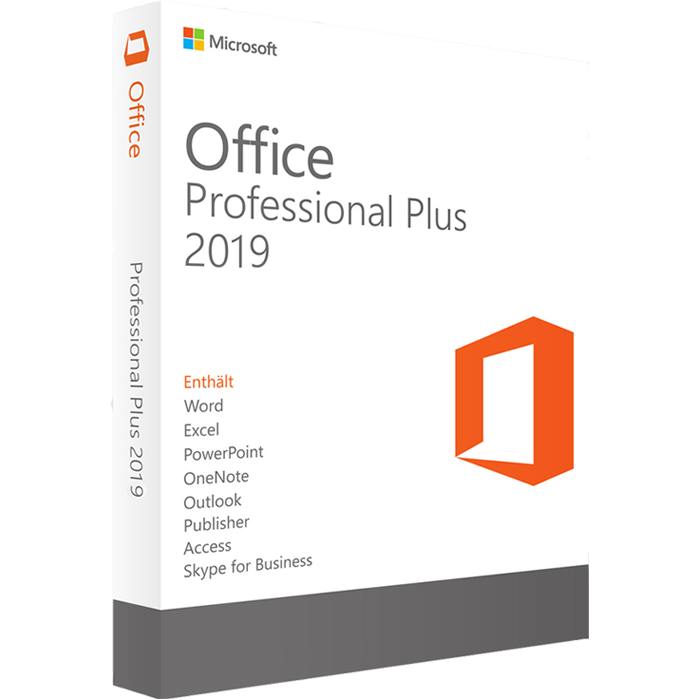
Microsoft Office 2019 Professional Plus – Easy Activation
Microsoft Office 2019 Professional Plus is a powerful productivity suite designed for users who need essential Microsoft Office applications on a compatible Windows computer. It includes popular applications such as Word, Excel, PowerPoint, Outlook, Access, Publisher, and OneNote, making it suitable for documents, spreadsheets, presentations, email, databases, notes, and everyday productivity tasks.
If you are looking for Office 2019 Professional Plus for a compatible Windows installation, this product provides access to a comprehensive collection of desktop Office applications. Before purchasing or installing, always check your Windows version and license requirements to ensure compatibility.
Microsoft Office 2019 Professional Plus Features
Microsoft Office 2019 Professional Plus provides a complete collection of desktop productivity applications for professional, educational, and personal workflows.
Depending on the licensed edition and installation method, the Office 2019 Professional Plus suite includes applications such as:
- Microsoft Word for creating and editing documents
- Microsoft Excel for spreadsheets, calculations, and data analysis
- Microsoft PowerPoint for presentations and slideshows
- Microsoft Outlook for email, calendars, and contacts
- Microsoft Access for database management
- Microsoft Publisher for creating publications and marketing materials
- Microsoft OneNote for digital notes and organization
These applications can help users manage common productivity tasks from a single Office suite.
Office 2019 Professional Plus for Windows
Office 2019 Professional Plus is designed for Windows environments. Microsoft documentation identifies Office Professional Plus 2019 as a volume-licensed commercial product and lists Windows 10 and Windows 11 among supported Windows versions for Office 2019.
Before installing Office 2019, make sure your computer meets the applicable system requirements. Microsoft recommends checking the official requirements because compatibility can depend on the Office edition, Windows version, architecture, and installation method.
For official compatibility information, visit the Microsoft Office 2019 system requirements.
Office 2019 Online Activation
The activation process depends on the type of Office 2019 license and how the product was supplied.
If your license requires a product key or another activation method, follow the activation instructions supplied with your purchase. Microsoft also provides official guidance for activating Office on Windows.
For additional information, see Microsoft’s Office activation guide.
Make sure that the license you purchase corresponds to the Office edition you intend to install. Office Professional Plus 2019 can have different licensing and deployment requirements from consumer Office editions, so the exact license type should always be verified before activation.
How to Install Microsoft Office 2019 Professional Plus
Installing Microsoft Office 2019 Professional Plus requires using the appropriate installation method for your license.
A typical installation process may include:
1. Check Your Windows Version
Before starting the installation, confirm that your computer is running a compatible Windows version and that sufficient storage and memory are available.
2. Prepare Your Office License
Keep your Office license information or activation details available. The exact process depends on the license type.
3. Download the Appropriate Installation Files
Use the installation method associated with your Office 2019 license. Microsoft provides official documentation covering installation and reinstallation of Office 2019.
You can consult the Microsoft Office 2019 installation guide for Microsoft’s official instructions.
4. Install Office Applications
Follow the installation instructions and select the required Office components where applicable.
5. Activate Office
After installation, complete the activation process using the license information supplied with your purchase.
If activation does not work, verify that the license matches the installed Office edition and follow Microsoft’s activation troubleshooting guidance.
What’s Included in Office Professional Plus 2019?
One of the main advantages of Microsoft Office 2019 Professional Plus is the range of applications included in the suite.
Microsoft Word
Create professional documents, letters, reports, resumes, and other text-based files with Microsoft Word.
Microsoft Excel
Use Excel for calculations, spreadsheets, tables, data organization, formulas, and analysis.
Microsoft PowerPoint
Create presentations, business slides, educational projects, and visual presentations using PowerPoint.
Microsoft Outlook
Manage email, calendars, contacts, and other communication tasks with Outlook.
Microsoft Access
Access provides database functionality for users who need to organize and manage structured information.
Microsoft Publisher
Publisher can be used to create brochures, flyers, newsletters, cards, and other publication-style documents.
Microsoft OneNote
OneNote helps users organize digital notes, information, ideas, and project material.
Microsoft provides additional information about the applications and deployment options available with Office 2019 in its official Office 2019 overview.
Office 2019 System Requirements
Before purchasing Microsoft Office 2019 Professional Plus, check your computer’s compatibility.
Microsoft’s published requirements for Office 2019 include supported Windows operating systems, a compatible processor, sufficient RAM, available storage, and an appropriate display resolution. Requirements can vary according to the Office configuration and installation environment.
For the most accurate and current compatibility information, always check Microsoft’s official system requirements before installation.
Important Office 2019 Support Information
Please note that Office 2019 is no longer supported by Microsoft. Microsoft states that support for Office 2019 suites and standalone applications ended on October 14, 2025.
This means customers should not purchase Office 2019 on the assumption that it currently receives normal Microsoft security updates or technical support.
Office 2019 may still be relevant for users who specifically need this version and have a compatible licensing and installation environment. However, customers looking for a currently supported Microsoft Office version should consider newer Office products.
Related Microsoft Products
If you are comparing different Microsoft software options, you can also explore other products available on Nexlic.
- Microsoft Office 2021 – Explore our Office 2021 products for compatible Windows computers.
- Microsoft Office 2024 – Discover newer Office options available for current installations.
- Windows 10 – Browse Windows 10 license options.
- Windows 11 – Explore Windows 11 license options for compatible PCs.
Add your actual Nexlic internal product URLs to these links before publishing.
Why Choose Office 2019 Professional Plus?
Microsoft Office 2019 Professional Plus remains a comprehensive desktop productivity suite for users who specifically require the Office 2019 generation.
Its collection of Word, Excel, PowerPoint, Outlook, Access, Publisher, and OneNote provides tools for many common business, education, and personal productivity tasks.
However, because Office 2019 reached the end of Microsoft support in 2025, buyers should carefully consider their compatibility requirements and long-term software needs before choosing this version.
Frequently Asked Questions
What is Microsoft Office 2019 Professional Plus?
Microsoft Office 2019 Professional Plus is a desktop Office suite that includes applications such as Word, Excel, PowerPoint, Outlook, Access, Publisher, and OneNote. Microsoft identifies Professional Plus 2019 as a volume-licensed commercial product.
Is Office 2019 Professional Plus compatible with Windows 11?
Microsoft’s Office 2019 documentation includes Windows 11 among supported Windows versions. However, compatibility can depend on the specific Office edition, license, installation method, and system configuration.
Does Office 2019 still receive Microsoft support?
No. Microsoft ended support for Office 2019 on October 14, 2025. Users should therefore not expect ongoing standard Microsoft support or security updates for Office 2019.
How do I activate Office 2019?
The activation process depends on the license type. Follow the activation instructions provided with your license and consult Microsoft’s official Office activation documentation if you need additional assistance.
Can I install Office 2019 on a new Windows computer?
Office 2019 can be installed on compatible Windows systems, but you should verify the license type, system requirements, and installation method before proceeding.
Final Information
Microsoft Office 2019 Professional Plus provides a broad collection of desktop productivity applications for compatible Windows installations. With Word, Excel, PowerPoint, Outlook, Access, Publisher, and OneNote, it can support a wide range of everyday productivity requirements.
Before purchasing, verify the exact license type, compatibility, installation method, and activation requirements. Because Microsoft ended Office 2019 support on October 14, 2025, customers should also consider whether a newer supported Office version better matches their needs.
For official product and installation information, refer to Microsoft’s documentation and verify that the license supplied with your purchase matches the Office edition you intend to activate.
## Related Microsoft Products
If you are looking for other Microsoft software, explore these related products available on Nexlic:
* Microsoft Office 2021 Professional Plus – Explore another Office version for compatible Windows computers.
* Microsoft Office 2024 Professional Plus – Discover a newer Office option for compatible installations.
* Microsoft Windows 10 Professional – Browse Windows 10 license options for compatible PCs.
* Microsoft Windows 11 Pro – Explore Windows 11 license options for compatible computers.
You can also visit our Nexlic software store to explore additional Windows and Microsoft Office products.


Reviews
There are no reviews yet.